Custom Global Routing with Cloudfront Functions

CloudFront Functions let you run lightweight JavaScript code at the edge, before a request ever reaches your origin. In this post I'll walk through how to use them for custom multi-region routing: cookie-based stickiness, geo-fallback, and health-aware origin selection.
Architecture Overview
Here's how the routing flow works end to end:
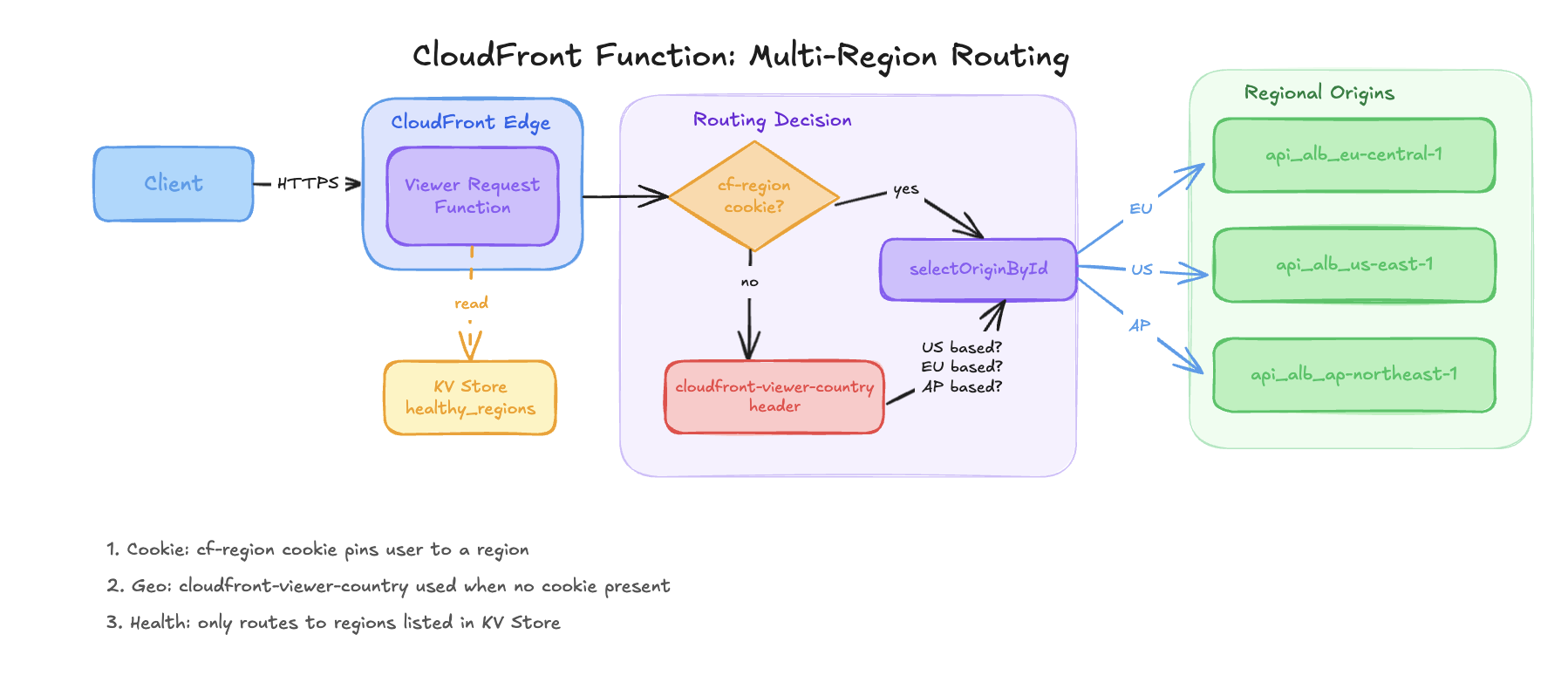
The client hits a single CloudFront distribution. The viewer-request function runs at the edge, reads healthy regions from the KV Store, picks a target region based on cookie or country header, then routes the request to the right regional ALB.
CloudFront Functions vs Lambda@Edge
To start off, a brief recap: CloudFront offers two ways to run code at the edge: CloudFront Functions (CFF) and Lambda@Edge. For routing logic, CFF is almost always the right choice.
| CloudFront Functions | Lambda@Edge | |
|---|---|---|
| Execution time limit | 1ms | 5s (viewer) / 30s (origin) |
| Runtime | JS only (ES5.1+, ES modules in 2.0) | Node.js, Python |
| KV Store access | ✅ Yes | ❌ No |
| Async / await | ✅ (runtime 2.0) | ✅ |
| Cost | ~1/6th the price | Higher |
| Trigger points | Viewer request/response only | Viewer + origin request/response |
Three CFF capabilities make routing possible:
cf.selectRequestOriginById(id)dynamically selects a named CloudFront origin at request time, without redirecting the clientKV Store is a low-latency key-value store readable from CFF. It's ideal for storing health state, like which regions are currently healthy
CloudFront viewer headers give you metadata like
cloudfront-viewer-countryandcloudfront-viewer-cityinjected automatically by CloudFront
The Routing Pattern
The function implements a three-tier routing decision:
Cookie wins. If the request carries a custom
cf-regioncookie pointing to a healthy region, use it.Geo-fallback. If no cookie, infer the region from
cloudfront-viewer-country.KV health check. Only route to regions listed as healthy in the KV Store.
import cf from 'cloudfront';
const kvs = cf.kvs();

async function handler(event) {
  var request = event.request;
  var headers = request.headers;

  // 1. Fetch healthy regions from KV Store
  var healthyRegions = ['eu-central-1'];
  try {
    var v = await kvs.get('healthy_regions');
    if (v && typeof v === 'string') {
      healthyRegions = v.split(',');
    }
  } catch (e) { /* key missing, keep default */ }

  // 2. Default to first healthy region
  var targetRegion = healthyRegions[0] ?? 'eu-central-1';

  // 3. Cookie-based stickiness
  if (request.cookies?.['cf-region']?.value) {
    var cookieRegion = request.cookies['cf-region'].value.toLowerCase();
    if (healthyRegions.includes(cookieRegion)) targetRegion = cookieRegion;

  // 4. Geo-based selection
  } else {
    var country = headers['cloudfront-viewer-country']?.value;
    var isUS = ['US','CA','MX','BR' /* ... */].includes(country);
    var isAP = ['JP','AU','SG','IN' /* ... */].includes(country);

    if (isUS && healthyRegions.includes('us-east-1'))           targetRegion = 'us-east-1';
    else if (isAP && healthyRegions.includes('ap-northeast-1')) targetRegion = 'ap-northeast-1';
    else if (healthyRegions.includes('eu-central-1'))           targetRegion = 'eu-central-1';
  }

  // 5. (Optional) Strip path prefix before forwarding to origin.
  // Uncomment if your origin doesn't expect the CloudFront path prefix.
  // var stripPrefix = '/api';
  // if (request.uri.startsWith(stripPrefix)) {
  //   request.uri = request.uri.substring(stripPrefix.length) || '/';
  // }

  // 6. Select origin and tag the request for observability
  cf.selectRequestOriginById('api_alb_' + targetRegion);
  request.headers['x-selected-region'] = { value: targetRegion };

  return request;
}
The Terraform below wires the three key pieces together: the KV Store, the function (with KV Store association), and the CloudFront origins.
# KV Store — holds the healthy_regions key updated by your health-check process
resource "aws_cloudfront_key_value_store" "region_health" {
  name    = "\({var.project_name}-\){var.environment}-region-health"
  comment = "Region health status for manual routing control"
}

# CloudFront Function — associates the KV Store so it can be read at runtime
resource "aws_cloudfront_function" "api_routing" {
  name                         = "\({var.project_name}-\){var.environment}-api-routing"
  runtime                      = "cloudfront-js-2.0"
  comment                      = "Routes /api requests to regional ALB origins"
  publish                      = true
  key_value_store_associations = [aws_cloudfront_key_value_store.region_health.arn]
  code                         = file("${path.module}/functions/api-routing.js")
}

# One VPC origin per regional ALB — origin ID must match what the function passes
# to selectRequestOriginById (e.g. "api_alb_eu-central-1")
resource "aws_cloudfront_distribution" "main" {
  # ... your existing distribution config ...

  origin {
    origin_id   = "api_alb_eu-central-1"
    domain_name = var.eu_alb_dns_name
    vpc_origin_config {
      vpc_origin_id = aws_cloudfront_vpc_origin.eu.id
    }
  }

  origin {
    origin_id   = "api_alb_us-east-1"
    domain_name = var.us_alb_dns_name
    vpc_origin_config {
      vpc_origin_id = aws_cloudfront_vpc_origin.us.id
    }
  }

  origin {
    origin_id   = "api_alb_ap-northeast-1"
    domain_name = var.ap_alb_dns_name
    vpc_origin_config {
      vpc_origin_id = aws_cloudfront_vpc_origin.ap.id
    }
  }

  ordered_cache_behavior {
    path_pattern             = "/api/*"
    target_origin_id         = "api_alb_eu-central-1" # default; overridden by the function
    viewer_protocol_policy   = "redirect-to-https"
    allowed_methods          = ["DELETE", "GET", "HEAD", "OPTIONS", "PATCH", "POST", "PUT"]
    cached_methods           = ["GET", "HEAD"]
    cache_policy_id          = data.aws_cloudfront_cache_policy.managed_caching_disabled.id
    origin_request_policy_id = aws_cloudfront_origin_request_policy.forward_all_except_host.id

    function_association {
      event_type   = "viewer-request"
      function_arn = aws_cloudfront_function.api_routing.arn
    }
  }
}
One thing to watch: the origin ID strings in Terraform (e.g. api_alb_eu-central-1) must exactly match what the function passes to selectRequestOriginById. A mismatch causes a silent fallback to the default origin.
Use Cases
Cookie-based stickiness Once a user lands on a region, set a cf-region response cookie via a separate viewer-response function. Subsequent requests from that user stick to that region as long as it remains healthy. Useful for session affinity or A/B testing.
Geo-based defaulting Using cloudfront-viewer-country, you can assign users to their nearest region without any client-side logic. No latency lookup needed; CloudFront injects the header automatically.
Health-aware failover Store a comma-separated list of healthy regions in the KV Store (e.g. eu-central-1,us-east-1). An external health-check process updates this key when a region degrades. The function reads it on every request, so no redeployment is needed to reroute traffic.
To update the KV Store manually, first get the current ETag, then write the new value:
# Find your KVS ARN
aws cloudfront list-key-value-stores --query "KeyValueStoreList.Items[].ARN" --output text

# Read current value + ETag
aws cloudfront-keyvaluestore get-key \
  --kvs-arn="arn:aws:cloudfront::ACCOUNT:key-value-store/KVS-ID" \
  --key="healthy_regions"

# Write new value (use ETag from above)
aws cloudfront-keyvaluestore put-key \
  --kvs-arn="arn:aws:cloudfront::ACCOUNT:key-value-store/KVS-ID" \
  --key="healthy_regions" \
  --value="eu-central-1,us-east-1" \
  --if-match="ETAG_FROM_GET_RESPONSE"
The --if-match flag is required. It's an optimistic lock to prevent overwriting concurrent updates.
Debugging
There are two separate log sources to be aware of.
Function logs: console.log() output from the CFF itself. Written automatically to CloudWatch Logs under /aws/cloudfront/function/<function-name> in us-east-1. Use these to trace routing decisions. Remove verbose logging before production; execution time is tight.
Access logs: per-request logs for the distribution itself (status codes, latency, cookies, country, etc.). These are not enabled by default. Wire them up in Terraform using CloudWatch standard logging (v2):
resource "aws_cloudwatch_log_group" "cloudfront_access_logs" {
  name              = "/aws/cloudfront/my-distribution-access-logs"
  retention_in_days = 7
  provider          = aws.us_east_1 # must be us-east-1 for CloudFront logging
}

resource "aws_cloudwatch_log_delivery_source" "cloudfront" {
  name         = "my-cloudfront-access-logs"
  log_type     = "ACCESS_LOGS"
  resource_arn = "arn:aws:cloudfront::ACCOUNT_ID:distribution/DIST_ID"
  provider     = aws.us_east_1
}

resource "aws_cloudwatch_log_delivery_destination" "cloudfront" {
  name          = "my-cloudfront-logs-destination"
  output_format = "json"
  delivery_destination_configuration {
    destination_resource_arn = aws_cloudwatch_log_group.cloudfront_access_logs.arn
  }
  provider = aws.us_east_1
}

resource "aws_cloudwatch_log_delivery" "cloudfront" {
  delivery_source_name     = aws_cloudwatch_log_delivery_source.cloudfront.name
  delivery_destination_arn = aws_cloudwatch_log_delivery_destination.cloudfront.arn
  record_fields            = ["date", "time", "c-ip", "c-country", "cs-uri-stem",
                              "sc-status", "time-to-first-byte", "x-edge-location",
                              "cs(Cookie)", "x-host-header"]
  provider = aws.us_east_1
}
Cookie logging is off by default for privacy reasons. Including cs(Cookie) in record_fields is not enough on its own, you also need to enable it on the distribution itself: CloudFront console > your distribution > Logging > Manage > Settings > turn on Cookie logging. Disable again when done.
Once access logs are flowing, a useful CWLI query to find the slowest endpoints per edge location:
FIELDS `cs-uri-stem`, `time-to-first-byte`, `x-edge-location`
| FILTER ispresent(`time-to-first-byte`) and ispresent(`cs-uri-stem`)
| STATS pct(`time-to-first-byte`, 80) as p80_latency, count(*) as request_count
    by `cs-uri-stem`, `x-edge-location`
| SORT request_count DESC
| LIMIT 500
| SORT p80_latency DESC
| LIMIT 10
To trace which region served a specific request, filter on the x-selected-region header that the function sets on every request, downstream services can log it too for end-to-end tracing.
Common Mistakes and How to Avoid Them
1. Execution time limit CloudFront Functions must complete within 1ms of compute time. KV Store reads are fast but not free. Keep your logic simple and avoid multiple sequential KV lookups. Check the AWS docs for current limits.
2. No origin request trigger CFF only runs on viewer request and viewer response, not origin request. If you need to modify the request after cache evaluation (e.g. to sign requests to your origin), you need Lambda@Edge for that leg.
3. KV Store consistency KV Store updates propagate globally in seconds but are eventually consistent. During a health failover, a small window exists where some edge nodes may still route to a degraded region. Build your origins to handle this gracefully.


